
Opened 13 years ago
Closed 12 years ago
#148 closed Aufgabe (fixed)
Trend: Skalierung und Zoom
| Reported by: | Melanie Hermann | Owned by: | Melanie Hermann |
|---|---|---|---|
| Priority: | kurzfristig | Milestone: | |
| Component: | Gesamtsystem | Version: | |
| Severity: | Verbesserung | Keywords: | |
| Cc: |
Description
Skalierung des Trends nocheinmal überdenken.
Attachments (6)
Change History (26)
comment:1 by , 13 years ago
| Priority: | kurzfristig → mittelfristig |
|---|
comment:2 by , 13 years ago
| Cc: | added |
|---|---|
| Priority: | mittelfristig → kurzfristig |
comment:3 by , 13 years ago
DONE:
- Werte in der Trendanzeige werden jetzt genauso wie in der Matrix formattiert.
Änderungen:
- Compat_Trend.cpp:
Neue Funktion Compat_GetFormatOfKoo(). Diese Funktion gibt die Formattierung des Matrixelementes zurück. - Trend.cpp:
GetValueAsString() ruft die Funktion Compat_GetFormatOfKoo() auf. Zuvor wurde hier fest formattiert, z.B. %f. Jetzt wird die Formattierung aus der Matrix verwendet.
comment:4 by , 13 years ago
| Cc: | removed |
|---|
by , 13 years ago
| Attachment: | Trend_Formatierung_Werte.jpg added |
|---|
comment:5 by , 13 years ago
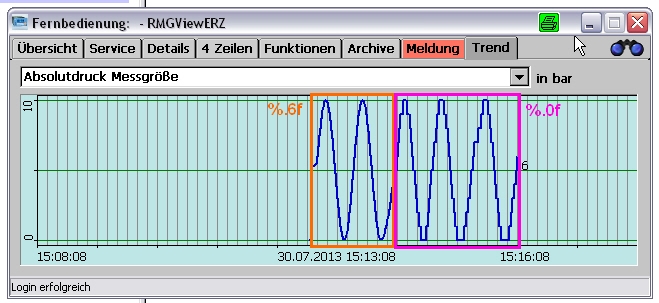
Der Anhang Trend_Formatierung_Werte.jpg zeigt, dass die Linie ohne Nachkommastellen grobere Abstufung zeigt als mit 6 Nachkommastellen.
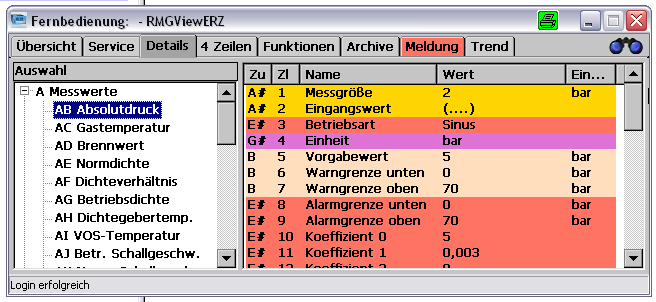
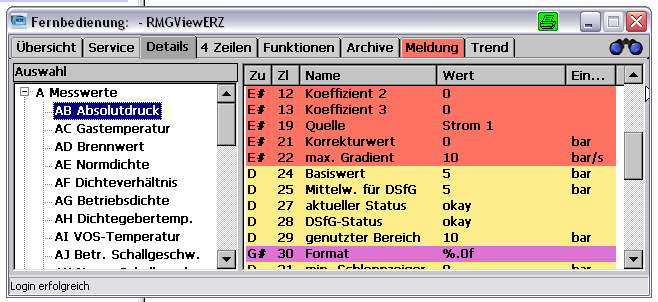
Die Anhänge Matrix_1.jpg und Matrix_2.jpg zeigen wie ein Wert, z.B. als Sinus, simuliert werden kann und wo die Genauigkeit (Formatierung) eingestellt werden kann.
by , 13 years ago
| Attachment: | Matrix_1.jpg added |
|---|
by , 13 years ago
| Attachment: | Matrix_2.jpg added |
|---|
comment:6 by , 13 years ago
| Resolution: | → fixed |
|---|---|
| Status: | new → closed |
comment:7 by , 13 years ago
Skalierung entspricht immer noch nicht der Vorstellung von Suhr....
Manchmal werden Werte nur als Strich dargestellt, kein Trend erkennbar, da die Grenzen zu weit gewählt sind.
comment:8 by , 13 years ago
| Resolution: | fixed |
|---|---|
| Status: | closed → reopened |
comment:9 by , 13 years ago
| Priority: | kurzfristig → mittelfristig |
|---|
comment:11 by , 12 years ago
| Priority: | mittelfristig → kurzfristig |
|---|
by , 12 years ago
| Attachment: | 20131016_Autoskalierung.xls added |
|---|
comment:12 by , 12 years ago
Der in 20131016_Autoskalierung.xls beschriebene Algorithmus wurde umgesetzt.
Es wurde lediglich die Funktion CTrend::RoundMinMax() in Trend.cpp geändert.
Aktuell wird die Skalierung im GC9300 und im ERZ2000-NG getestet.
Vorher:
float RoundValue(float fZahl, int stellen, bool roundUp)
{
  fZahl *= (float)pow(10, stellen);
  if (fZahl >= 0)
  { // Positive Zahl
    if (true == roundUp)
      fZahl += 1.0;
    fZahl = (float)floor(fZahl); // floor(): Rundet positive Zahlen ab
  }
  else
  { // Negative Zahlen
    if (false == roundUp)
      fZahl -= 1.0;

    fZahl = (float)ceil(fZahl);  // ceil(): Rundet negative Zahlen auf
  }
  fZahl = (int)fZahl * (float)pow(10, -stellen);
  return fZahl;
}
void CTrend::RoundMinMax(int idx, float lokalMin, float lokalMax)
{
  float diff = (float)fabs(lokalMax - lokalMin);

  CString sDiff;
  sDiff.Format(L"%f", diff);

  int diffLength = sDiff.GetLength();
  int commaPos = sDiff.Find(L".");

  int posFirstDiff = 0, stellen = 0;
  if (0 != (int)diff)
  { // Wenn vor dem Komma eine Differenz existiert
    int digitsBeforeComma = commaPos;
    CString sBeforeComma = sDiff.Left(digitsBeforeComma);
    posFirstDiff = sBeforeComma.FindOneOf(L"123456789");
    posFirstDiff = digitsBeforeComma - posFirstDiff - 1;
    stellen = posFirstDiff * -1;
  }
  else
  { // Wenn erst nach dem Komma eine Differenz existiert
    int digitsAfterComma  = diffLength - commaPos - 1;
    CString sAfterComma = sDiff.Right(digitsAfterComma);
    posFirstDiff = sAfterComma.FindOneOf(L"123456789");
    stellen = posFirstDiff;
  }

  if (m_roundedMinLimit[idx] != lokalMin)
  { // Minimum nur neu berechnen, wenn es sich geändert hat
    bool roundUp = false;
    m_roundedMinLimit[idx] = RoundValue(lokalMin,  stellen, roundUp);
  }

  if (m_roundedMaxLimit[idx] != lokalMax)
  { // Maximum nur neu berechnen, wenn es sich geändert hat
    bool roundUp = true;
    m_roundedMaxLimit[idx] = RoundValue(lokalMax,  stellen, roundUp);
  }
}
Aktuell:
void CTrend::RoundMinMax(int idx, float min, float max)
{
  double diff     = 0;
  double diffPos  = 0;
  double lokalMax = 0;
  double lokalMin = 0;

  // Diff-Position erfassen
  diff = fabs(max - min);

  if (diff == 0.0)
  {
    m_roundedMaxLimit[idx] = max;
    m_roundedMinLimit[idx] = min;
    return;
  }

  diffPos = log10(diff);

  if (diffPos < 0)
    diffPos = ceil(diffPos);
  else
    diffPos = floor(diffPos);


  // Max. aufrunden
  lokalMax = (double)max / pow(10, diffPos);

  if (lokalMax < 0)
    lokalMax = floor(lokalMax);
  else
    lokalMax = ceil(lokalMax);

  lokalMax = lokalMax * pow(10, diffPos);

  m_roundedMaxLimit[idx] = (float)lokalMax;


  // Min. abrunden
  lokalMin = (double)min / pow(10, diffPos);

  if (lokalMin < 0)
    lokalMin = ceil(lokalMin);
  else
    lokalMin = floor(lokalMin);

  lokalMin = lokalMin * pow(10, diffPos);

  m_roundedMinLimit[idx] = (float)lokalMin;
}
by , 12 years ago
| Attachment: | 20131018_Autoskalierung.xls added |
|---|
comment:13 by , 12 years ago
Die Funktion für die Skalierung wurde nochmals angepasst.
void CTrend::RoundMinMax(double *min, double *max)
{
  double diff = 0, diffPos = 0;

  diff = fabs(*max - *min);
  if (diff == 0.0)
    return;

  // Diff-Position erfassen
  diffPos = log10(diff);
  diffPos = floor(diffPos);
  diffPos -= 1;

  // Max. aufrunden
  *max = *max / pow(10, diffPos);
  *max = ceil(*max);
  *max = *max * pow(10, diffPos);

  // Min. abrunden
  *min = *min / pow(10, diffPos);
  *min = floor(*min);
  *min = *min * pow(10, diffPos);
}
Aktuell skaliert der Trend immer auf den sichtbaren Bereich.
Hierfür wurde folgende Funktion implementiert.
void CTrend::CalcDisplayedMinMax(int startIdx, int endIdx, int anzValues, double sortedValues[3600])
{ // Min/Max wird abhängig von den sichtbaren Werten skaliert

  if (startIdx < 0)
  {
    m_displayedMin = sortedValues[0];
    m_displayedMax = sortedValues[0];
  }
  else
  {
    m_displayedMin = sortedValues[startIdx];
    m_displayedMax = sortedValues[startIdx];
  }

  for (int c = startIdx; c <= endIdx; c++)
  {
    if ((c < 0) || (c >= ANZ_VALUES))
    {
      continue;
    }

    if (c >= anzValues)
    {
      break;
    }

    if (sortedValues[c] < m_displayedMin)
      m_displayedMin = sortedValues[c];

    if (sortedValues[c] > m_displayedMax)
      m_displayedMax = sortedValues[c];
  }

  RoundMinMax(&m_displayedMin, &m_displayedMax);
}
Und die Funktion GetValueAsString() wurde angepasst, um krumme Min-Max-Zahlen zu vermeiden.
So wurde z.B. 27140000 als 27139999,999... dargestellt.
CString CTrend::GetValueAsString(double valOriginal)
{
  wchar_t *stopstring;
  CString sTempFloat;
  wchar_t frm[21];
  CString sValConverted;

  sTempFloat.Format(_T("%.0f"), valOriginal);

  memset(frm, 0x00, 21);
  Compat_GetFormatOfKoo(frm, CTrendInterface::sm_trendvalues[CDlgTrend::sm_comboBoxValueSel].kooIdxOfValue);

  switch (m_datatype)
  {
	 case COMPAT_TYPE_DOUBLE:
		sValConverted.Format(frm, (double)valOriginal);
		break;
	 case COMPAT_TYPE_FLOAT:
		sValConverted.Format(frm, (float)valOriginal);
		break;
	 case COMPAT_TYPE_INT:
		sValConverted.Format(frm, (int)_wtoi(sTempFloat));
		break;
	 case COMPAT_TYPE_LONG:
		sValConverted.Format(frm, (long)wcstol(sTempFloat, &stopstring, 10));
		break;
	 case COMPAT_TYPE_SHORT:
		sValConverted.Format(frm, (short)_wtoi(sTempFloat));
		break;
	 case COMPAT_TYPE_ULONG:
		sValConverted.Format(frm, (unsigned long)wcstoul(sTempFloat, &stopstring, 10));
		break;
	 case COMPAT_TYPE_USHORT:
		sValConverted.Format(frm, (unsigned short)wcstoul(sTempFloat, &stopstring, 10));
		break;
	 default:
		break;
  }

  return sValConverted;
}
comment:14 by , 12 years ago
Der Trend kann nun gezommt werden.
Hierfür wurde auf dem Trend-Dialog eine Scrollbar eingebaut.
Die Klasse CDlgTrend hat folgende neue Member erhalten:
- CScrollBar m_zoom;
- static int sm_zoomPos;
- static void MakeZoomPosPublic(int zoomPos);
- void OnVScroll(UINT nSBCode, UINT nPos, CScrollBar* pScrollBar);
Im Modul Trend.cpp wurde Folgendes geändert:
- Draw():
- CLimitPen ist jetzt rot, nicht mehr dunkelgrün
- Die Mittellinie wird jetzt schwarz gezeichnet
- DrawYAxisLabels(), DrawMin(), DrawMax() und !DrawYMarks() wird jetzt regelmäßig gezeichnet. Diese Funktionen werden in DrawTrend() aufgerufen.
- Die neue Variable zoom wirkt in den folgenden Funktionen:
- DrawMin(): Positionierung der Minimum-Grenze
- DrawMax(): Positionierung der Maximum-Grenze
- DrawYMarks(): Positionierung der Y-Achsenmarkierungen
- DrawTrend(): Umrechnung der Werte auf Pixel
by , 12 years ago
| Attachment: | 20131023_Trend_Zoomfunktion.xls added |
|---|
comment:15 by , 12 years ago
| Summary: | Trend: Skalierung → Trend: Skalierung und Zoom |
|---|
comment:16 by , 12 years ago
Nach Löschen der Trends wird der Trend wieder auf Default-Zoom und auf Autoupdate eingestellt.
- CTrendInterface::DeleteAllTrendValues():
- Setzen von CDlgTrend::sm_zoomPos
- Aufruf von CTrend::SetAutoupdate()
- CTrend:
- SetAutoupdate(): Neue Funktion zum Setzen von sm_horiPos
- sm_horiPos wurde als static deklariert, da die Variable jetzt auch in der public & static Funktion SetAutoupdate()' gesetzt wird
comment:17 by , 12 years ago
Min/Max-Skalierung des Trends nun umschaltbar: über alle Werte / über sichtbare Werte.
- Neuen Button in TrendDlg angelegt
- Dilaog.txt: Texte für neuen Button definiert
- CDlgTrend::Localize(): Text des Buttons wird entsprechend der Sprache gesetzt
- CDlgTrend::MakeMinMaxStylePublic(): Neue Funktion, die den ausgewählten MinMaxStyle öffentlich macht für CTrend
- CDlgTrend::OnBnClickedButtonMinmax() Neue Funktion, die bei Klick den Text des Buttons und den MinMaxStyle wechselt
- CTrend::CalcDisplayedMinMax(): Sucht Min/Max abhängig vom MinMaxStyle entweder in den sichtbaren Werten oder in allen vorhandenen Werten.
comment:19 by , 12 years ago
Zyklus des Trends wurde wieder 1 Minute gesetzt.
Software wurde wieder zum Test im GC9300-Testrack installiert.
comment:20 by , 12 years ago
| Resolution: | → fixed |
|---|---|
| Status: | reopened → closed |




Gemeinsam mit Gerd und Volker diskutieren, ob bessere Ideen für Autoskalierung.